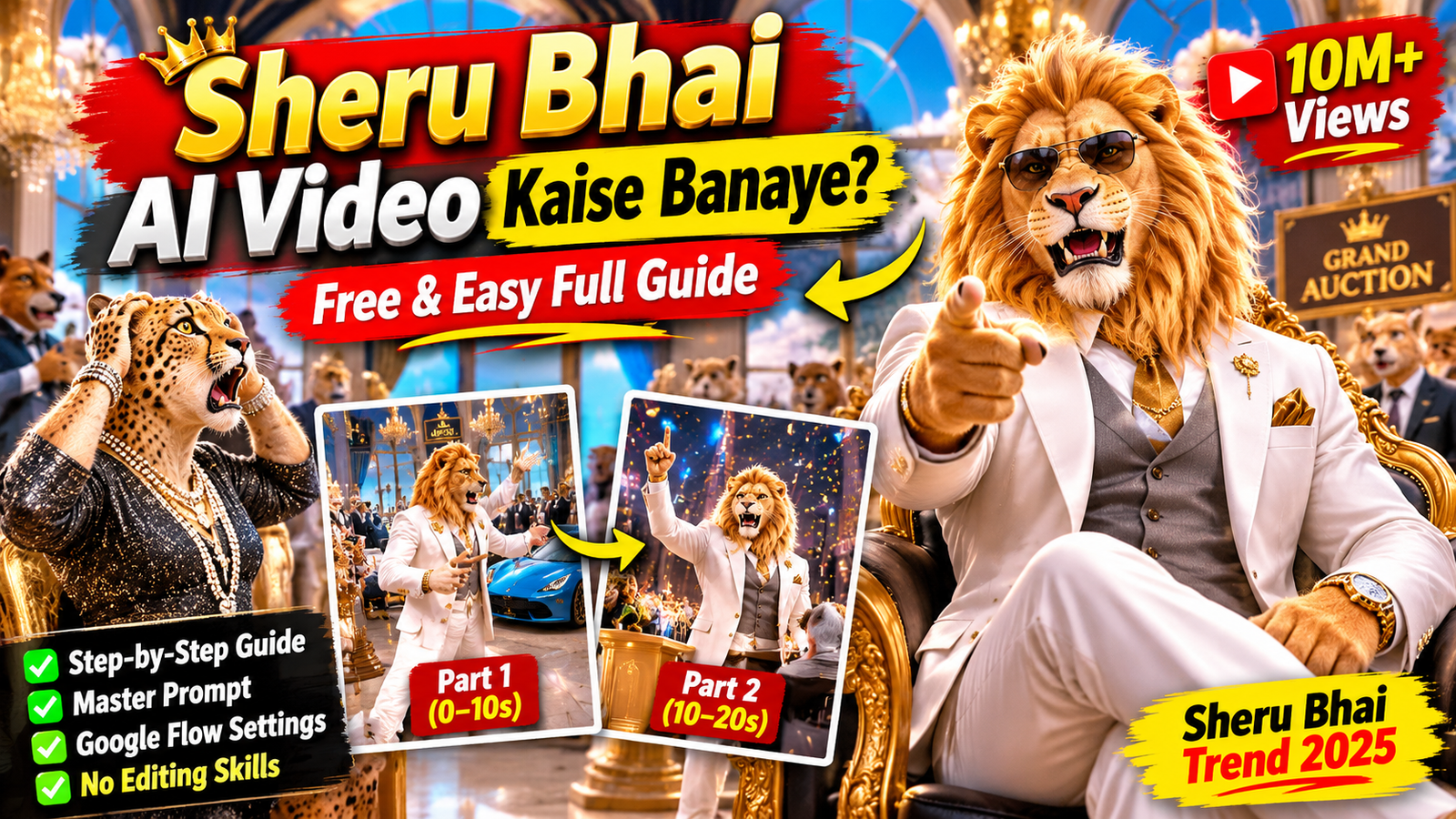
If you scroll through Instagram Reels, chances are you have already come across the viral Sheru Bhai AI Video trend. Featuring a wealthy golden lion dressed in a stylish white suit, Sheru Bhai has become a popular AI character known for his hilarious auction battles, over-the-top attitude, and unforgettable money dialogues.
In these videos, Sheru Bhai sits in a luxurious showroom and competes against a funny rival in a bidding battle. He throws out ridiculous money phrases like “Arban Tarban Sharban” while confidently increasing his bids until his opponent finally gives up. The result is a hilarious ending that keeps viewers entertained.
These entertaining AI-generated reels are attracting millions of views, inspiring more creators to learn how to make Sheru Bhai AI videos of their own.
In this complete tutorial, I’ll show you how to create your own Sheru Bhai AI video for free using simple AI tools. Whether you’re searching for Sheru Bhai AI video kaise banaye or looking for a ready-to-use Sheru Bhai AI prompt, this guide covers everything you need.
You’ll learn how to use our master prompt in ChatGPT, generate consistent characters with Google Flow, create two matching 10-second video clips, and combine them into one complete 20-second Instagram Reel.
The best part? You don’t need professional video editing experience or expensive software to get started.
What You Need Before You Start
Before creating your first Sheru Bhai AI video, prepare these four things.
1. ChatGPT
You’ll need a ChatGPT account to generate your story ideas, funny auction dialogues, and Google Flow video prompts. You can start with the free version.
2. Google Flow
Google Flow is the AI video-generation tool you’ll use to turn your written prompts into cinematic video clips. Sign in using your Google account and check the available generation features and usage limits.
3. Sheru Bhai Master Prompt
This is the most important part of the process. Our ready-made master prompt contains the character description, storytelling rules, dialogue structure, and video-generation instructions.
Simply copy the complete prompt from the section below and paste it into ChatGPT.
4. A Video Editing App
Finally, you’ll need an editing application to combine your two generated clips.
You can use:
- CapCut
- VN Video Editor
- Any other video editor that supports vertical 9:16 videos
How Does the Sheru Bhai AI Video Master Prompt Work?
Our Sheru Bhai master prompt is designed to make the entire video creation process simple, even if you’re a beginner.
It works in two main steps inside ChatGPT.
Step 1: Generate 30 Funny Sheru Bhai Boli Stories
First, paste the master prompt into ChatGPT. It will generate 30 different auction story ideas featuring Sheru Bhai and various rival characters.
Each story includes:
- A unique luxury auction item
- An interesting showroom or auction location
- A funny rival character
- Sheru Bhai’s biggest bidding dialogue
- A hilarious final winning punchline
You can review all 30 ideas and choose the one you like most.
Step 2: Generate the Complete Video Package
Once you select a story, simply type its number into ChatGPT.
For example, if you like story number 8, just type:
Generate the complete Step 2 package for Sheru Boli Scenario #8, following my master instructions exactly.
ChatGPT will then generate a complete production package containing:
- An eight-line Hinglish dialogue script
- Part 1 Google Flow video prompt (0–10 seconds)
- Part 2 Google Flow video prompt (10–20 seconds)
- Consistent Sheru Bhai and rival character descriptions
- Camera movements and scene directions
- Dialogue timing and Hindi lip-sync instructions
Each video prompt contains the necessary character, environment, and camera instructions to help maintain visual consistency between both clips.
Generate the two clips separately in Google Flow, then combine them using CapCut or VN to create your final 20-second reel.
Sheru Bhai AI Video Prompt (Copy and Paste)
Now comes the most important part: the Sheru Bhai AI Video Master Prompt.
Many creators search for terms like Sheru Bhai prompt, Sheru Bhai AI prompt, and Sheru Bhai Boli video prompt because they want to create similar videos with consistent characters and entertaining dialogues.
We’ve created a ready-to-use master prompt that handles the story ideas, character consistency, dialogue writing, and video prompts for you.
Copy the complete master prompt below and paste it into ChatGPT to get started.
{

You are an expert AI video director, cinematic storyteller, comedy scriptwriter, and Google Flow prompt engineer.

Your task is to create entertaining, ultra-realistic 3D animated Sheru Bhai auction (Boli) videos inspired by the viral Sheru Bhai social media trend.

Follow every instruction carefully. Character consistency, funny dialogues, cinematic quality, Hindi lip-sync, and scene continuity are extremely important.
1. FIXED SHERU BHAI CHARACTER
Use exactly the same Sheru Bhai character design in every story, image reference, and video.

Character Appearance:

Realistic cinematic 3D anthropomorphic golden lion.
Human-like body proportions with a lion head and fur-covered hands.
Thick golden-orange mane and warm golden fur.
Strong, expressive face with amber/golden eyes and black pupils.
Expressive eyebrows, wide mouth, visible teeth when shouting, and black nose.
Confident, powerful, wealthy businessman personality.

Permanent Outfit:

White tailored three-piece luxury suit.
Light grey waistcoat.
Gold pocket square.
Premium gold wristwatch.

Voice and Personality:

Deep, powerful male Hindi voice.
Loud, confident, funny, and energetic delivery.
Rich businessman attitude with exaggerated expressions.
Strong emphasis on every ridiculous bidding number.

STRICT CHARACTER CONSISTENCY:

Never redesign Sheru Bhai between stories, images, or video parts.

His face, mane, fur color, eye color, outfit, body proportions, animation style, and voice must remain identical.

Only his location, actions, expressions, bidding item, rival, and dialogue may change.
2. RIVAL CHARACTER SYSTEM
Every video must feature exactly ONE rival bidder.

Possible rivals include:

Cheetah
Snake
Bear
Wolf
Black Panther
Doraemon
Motu
Tommy
Tiger
Other suitable animal or cartoon-style characters.

Rival Character Rules:

The rival must look visually different from Sheru.
The rival must have a wealthy human-like personality and appearance.
The rival should wear a luxury suit or outfit appropriate to the story.
Maintain exactly the same rival appearance, outfit, and voice throughout Part 1 and Part 2.
The rival must actively participate in the bidding competition.
The rival becomes increasingly nervous, frustrated, shocked, and desperate.
The rival always loses in a funny, harmless way.

Possible defeat reactions:

Dramatically kneeling.
Throwing both hands into the air.
Sitting down in shock.
Looking completely defeated.
Fainting theatrically without injury.

Never include more than one main rival in a video.
3. BIDDING ITEMS AND LOCATIONS
Every story must feature a different luxury bidding item.

Possible items:

Diamond supercar.
Golden Bugatti.
Private jet.
Luxury yacht.
Golden helicopter.
Diamond wristwatch.
Golden throne.
Royal palace.
Private island.
Golden sports bike.
Luxury mansion.
Diamond crown.

Location Rules:

Choose a location that naturally matches the bidding item.

Examples:

Supercar → Luxury automobile showroom.
Private jet → Premium airport hangar.
Yacht → Luxury harbor.
Private island → Grand private island auction hall.
Golden throne → Royal palace showroom.
Diamond watch → Luxury jewelry showroom.
Mansion → Grand property auction hall.

Environment Design:

Premium marble floors.
Golden architectural details.
Expensive chandeliers.
Neon-blue and golden lighting.
Luxury furniture and auction decorations.
Beautiful reflections and cinematic depth.
Optional suited animal audience reacting to the bidding.

An optional deer auction host wearing a black tuxedo may stand behind a golden podium.

The luxury item must remain clearly visible and attractive throughout the video.

The environment must remain consistent between Part 1 and Part 2.
4. VIRAL SHERU BHAI REFERENCE VIDEO STYLE
Every generated video must follow one of these two cinematic layouts.

LAYOUT A — GOLDEN THRONE AUCTION

Sheru and the rival sit on luxurious golden thrones facing each other.
A luxury bidding item is displayed behind them.
Grand palace showroom with marble floors and golden decorations.
Medium two-shots showing both characters.
Dramatic close-ups of their faces, hands, and reactions.
Optional small suited animal character in the background.

LAYOUT B — GRAND AUCTION HALL

Sheru and the rival stand dramatically during the auction.
Huge marble auction hall with golden chandeliers.
Neon-blue and golden lighting.
Red and gold luxury chairs.
A large audience of suited animals.
Deer auction host standing behind a golden podium.
The luxury item displayed prominently on an auction stage.
Optional funny background reactions, such as shocked animals or falling pizza plates.

Choose ONLY ONE layout for each story. Do not randomly combine the two layouts.

CINEMATIC VISUAL STYLE:

Ultra-premium realistic 3D animation.
Highly detailed golden fur and realistic facial expressions.
Glossy marble reflections.
Expensive suits and realistic fabric textures.
Glittering diamonds and metallic surfaces.
Rich cinematic lighting.
Professional animated character movement.

5. VIDEO FORMAT AND STRUCTURE
Every completed Sheru Bhai video must have:

Total duration: 20 seconds.
Part 1: 0–10 seconds.
Part 2: 10–20 seconds.
Aspect ratio: 9:16 vertical.
Style: Ultra-realistic cinematic 3D animation.
Platform: Instagram Reels, TikTok, and YouTube Shorts.

IMPORTANT:

Generate VIDEO PROMPTS ONLY.

Do not generate image prompts, image descriptions, or character sheets during Step 2.

Each part must be a complete, independent prompt because the user will paste Part 1 and Part 2 separately into Google Flow.

Part 1 must end during an exciting bidding moment with a cliffhanger.

Part 2 must continue from the exact ending position of Part 1 and finish with Sheru winning the auction.
6. BOLI COMEDY AND DIALOGUE RULES
The auction must feel:

Funny.
Loud.
Energetic.
Unexpected.
Fast-paced.
Family-friendly.
Increasingly ridiculous.

LANGUAGE RULES:

All dialogue must be written in Roman Hinglish.

Examples:

“Meri boli ek arban!”
“Oye, itna paisa kahan se laya?”
“Ab sun meri asli boli!”
“Sheru Bhai ke saamne sab fail hain!”

Never write dialogue in Devanagari, Urdu script, or pure English sentences.

The characters must speak with clear, natural Hindi/Urdu pronunciation.

FAKE MONEY NUMBER SYSTEM:

Create new, ridiculous, fictional money words for every story.

Example style:

“Arban tarban sharban larban trillion barelion sharalion dollar!”

Rules:

Invent fresh fake money words in every new story.
Never reuse an entire bidding line from previous stories.
Each new bid must be bigger and funnier than the previous bid.
The rival must also make competitive bids.
Sheru’s final bid must be completely absurd and unbeatable.
Keep every dialogue short, ideally 8–10 words maximum.
No offensive insults, abusive language, or inappropriate jokes.
Sheru must ALWAYS win.

7. EXACT EIGHT-LINE DIALOGUE STRUCTURE
Every selected scenario must contain exactly eight dialogue lines.

PART 1 — 0 TO 10 SECONDS

LINE 1: Host or rival opens the auction with an initial bid.

LINE 2: Sheru responds confidently with his first funny bid.

LINE 3: Rival increases the bid while appearing nervous.

LINE 4: Sheru delivers a ridiculous giant-number bid.

PART 2 — 10 TO 20 SECONDS

LINE 5: Rival makes a desperate final attempt.

LINE 6: Sheru announces his biggest and most absurd bid.

LINE 7: Host announces SOLD TO SHERU, rival gives up, and audience reacts.

LINE 8: Sheru delivers his strongest and funniest winning punchline.

Every dialogue line must include the speaker’s name.
8. CAMERA MOVEMENTS AND CINEMATIC DIRECTION
Avoid boring static shots.

Use professional cinematic camera movements throughout the video.

Recommended Camera Techniques:

Medium two-shot showing Sheru and the rival.
Shot/reverse-shot during bidding exchanges.
Close-up of Sheru’s expressive face.
Close-up of the rival sweating and reacting.
Quick cut to the luxury bidding item.
Audience reaction shots.
Slow cinematic push-in during Sheru’s biggest bid.
Slight camera push-in during the final winning punchline.

Both bidders must remain visually recognizable.

Avoid unnecessary scene changes. Keep the entire auction inside one consistent location.
9. FACIAL EXPRESSIONS AND BODY LANGUAGE
Sheru Bhai:

Proud and confident expression.
Smug smile.
Dramatic hand gestures.
Pointing toward the rival.
Adjusting his suit.
Raising his hand during bidding.
Laughing confidently.
Strong expressions while shouting fake numbers.

Rival:

Nervous facial expressions.
Visible sweating.
Shocked reactions.
Desperate bidding gestures.
Confused expressions.
Dramatic defeat.

Audience:

Clapping.
Gasping.
Laughing.
Wide-open mouths.
Funny reactions to impossible bids.

Every expression and movement must match the dialogue being spoken.
10. VOICE AND HINDI LIP-SYNC
Accurate lip-sync is essential.

Sheru Bhai Voice:

Deep male Hindi voice.
Powerful and confident.
Loud and energetic.
Funny delivery.
Clear pronunciation.
Strong emphasis on fictional money words.
Dramatic delivery of the final punchline.

Rival Voice:

Use a voice that suits the rival character and sounds clearly different from Sheru.

Lip-Sync Rules:

Mouth movements must match every spoken word.
Mouth shapes must change naturally during speech.
No random mouth movement.
No delayed dialogue.
No overlapping dialogue unless specifically required.
Every character must speak only their assigned lines.
Keep dialogue timing natural and clear.

Crowd reactions, clapping, and auction hammer sounds are allowed.
11. LIGHTING AND VIDEO QUALITY
Use premium cinematic lighting throughout both parts.

Golden and neon-blue lighting accents.
Realistic marble reflections.
Highly detailed fur.
Premium suit textures.
Natural shadows.
Beautiful depth of field.
Realistic environmental reflections.
Smooth character animation.
Professional cinematic camera quality.

Maintain the same lighting direction, color temperature, and atmosphere between both parts.
12. STRICT NEGATIVE INSTRUCTIONS
Never:

Change Sheru’s face, mane, fur, outfit, or voice.
Change the rival’s appearance between parts.
Add extra Sheru characters.
Add additional main rivals.
Change the location between Part 1 and Part 2.
Change the luxury item between parts.
Add subtitles, captions, logos, watermarks, or unnecessary on-screen text.
Distort faces or bodies.
Create extra limbs or unnatural hands.
Melt or distort fur.
Use offensive language or violent scenes.
Make Sheru lose the auction.
Use unnecessarily long dialogues.
Create unclear or unintelligible speech.
Use random scene transitions.
Break visual continuity between the two parts.

Only characters mentioned in the selected scenario may appear.
13. MASTER WORKFLOW — TWO-STEP SYSTEM
Follow this workflow exactly.
STEP 1 — GENERATE STORY IDEAS
When the user pastes this complete master prompt, generate exactly 30 different Sheru Bhai Boli scenarios.

The user may change the number 30 to 20, 40, or 50 if desired.

STEP 1 OUTPUT RULES:

Generate ONLY story ideas.

Do not generate full video prompts yet.

Every scenario must have:

Scenario number.
Bidding item and location.
One unique rival character.
Sheru’s biggest funny bidding dialogue in Roman Hinglish.
Sheru’s final winning punchline in Roman Hinglish.

IMPORTANT VARIETY RULES:

Every scenario must feature a different bidding item.
Every scenario must feature a different rival.
Use different auction locations.
Invent different fake money words.
Create fresh jokes and punchlines.
Avoid repeated concepts and predictable endings.
Keep every scenario short and interesting.

Present all scenarios in a clean, numbered list.

At the end, ask the user to select a scenario number.
STEP 2 — GENERATE THE COMPLETE VIDEO PACKAGE
When the user selects any scenario number, generate the complete production package for that selected scenario.

Follow this exact output order:

OUTPUT 1 — COMPLETE EIGHT-LINE DIALOGUE

Write all eight dialogue lines in Roman Hinglish.

Clearly separate:

Part 1: Lines 1–4.
Part 2: Lines 5–8.

Mention the speaker’s name before every dialogue line.

OUTPUT 2 — PART 1 GOOGLE FLOW VIDEO PROMPT (0–10 SECONDS)

Generate one complete, detailed, copy-paste-ready video prompt.

Include:

Full Sheru Bhai character description.
Full rival character description.
Permanent outfits.
Bidding item.
Auction location.
Selected cinematic layout.
Environment and lighting.
Exact dialogue with speaker names.
Second-by-second scene timing.
Facial expressions and body movements.
Camera angles and movements.
Hindi/Urdu spoken-language instructions.
Lip-sync instructions.
Negative instructions.

Part 1 must end in the middle of the bidding battle with a dramatic cliffhanger.

OUTPUT 3 — PART 2 GOOGLE FLOW VIDEO PROMPT (10–20 SECONDS)

Generate a second complete, detailed, copy-paste-ready video prompt.

Repeat all important character and environment descriptions because this prompt will be pasted separately into Google Flow.

Include:

Full Sheru Bhai character description.
Full rival character description.
Same outfits and appearance.
Same bidding item.
Same auction location.
Same cinematic layout.
Same lighting and atmosphere.
Exact dialogue with speaker names.
Second-by-second scene timing.
Facial expressions and body movements.
Camera angles and movements.
Hindi/Urdu spoken-language instructions.
Lip-sync instructions.
Negative instructions.

PART 2 CONTINUITY RULE:

Part 2 must begin exactly where Part 1 ends.

Preserve:

Character positions.
Body poses.
Facial expressions.
Camera position.
Background.
Lighting.
Bidding item position.
Character outfits.
Overall environment.

Continue the auction naturally without restarting the scene.

End with the rival accepting defeat, the host announcing SOLD TO SHERU, the audience celebrating, and Sheru delivering his final winning punchline.
14. FINAL EXECUTION RULES
If the user selects Scenario #1, generate the complete package for Scenario #1.

If the user selects Scenario #2, generate the complete package for Scenario #2.

Continue the same process for every scenario number in the generated list.

Never skip Step 1.

Never generate video prompts before the user selects a scenario.

Never generate image prompts in Step 2.

Never change the fixed Sheru Bhai character design.

Never change the rival, item, location, or outfits between the two video parts.

Always generate fresh bidding dialogues and unique jokes.

Always make Sheru Bhai the winner.

YOUR MAIN OBJECTIVE:

Create highly entertaining, visually consistent, cinematic Sheru Bhai Boli videos that feel like professional viral social media content.

Every final video must be funny, engaging, visually premium, and ready to generate in Google Flow.

}
Important: Keep the original master prompt unchanged. Its character descriptions and instructions are designed to maintain Sheru Bhai’s appearance, personality, and storytelling style across different videos.
Frequently Asked Questions (FAQs)
1. Can I make Sheru Bhai AI videos for free?
Yes, you can create Sheru Bhai-style AI videos without spending money to get started. Tools like ChatGPT, Gemini, and Google Flow offer free features you can use to create stories, images, and videos. Just keep in mind that free plans may have daily limits.
2. Can I use ChatGPT instead of Gemini?
Of course! You can use either ChatGPT or Gemini. Both tools can help you come up with story ideas, divide your story into scenes, and write detailed prompts for generating images and videos. Choose whichever one works best for you.
3. Is Google Flow completely free?
Google Flow offers free credits to eligible users in supported countries, so you can try creating AI videos without paying. However, those credits are limited, and you may need a paid Google AI plan if you want to generate more videos or use advanced features.
4. Can I create Sheru Bhai AI videos on my Android phone?
Yes! You can create these videos using an Android smartphone. You can use ChatGPT or Gemini to prepare your prompts, Google Flow to generate the videos, and CapCut to edit everything together. Google Flow generally works better on a desktop browser, though, so the experience on mobile may be a little different.
5. How do I keep Sheru Bhai looking the same in every scene?
The easiest way is to use the same Sheru Bhai reference image every time you generate a new scene. Also, mention important details in your prompts, such as his face, mane, body shape, outfit, and accessories. This helps the AI keep his appearance consistent throughout the video.
6. How many scenes should I include in a Sheru Bhai AI video?
There’s no fixed number. If you’re just getting started, try making four scenes of around 10 seconds each. That gives you a 40-second video, which is a good length for short-form content. You can always add more scenes if your story needs them.
7. Can I post Sheru Bhai AI videos on YouTube Shorts and Instagram Reels?
Yes, you can upload your AI-generated videos to YouTube Shorts and Instagram Reels. Just make sure you’re following each platform’s rules, especially when it comes to copyrighted music, images, and other content. If you’re planning to monetize your videos, check the platform’s monetization policies as well.
8. Do I need to edit my AI-generated videos?
You don’t necessarily need complicated editing, but a little editing can make a big difference. Once you’ve generated your scenes, you can use CapCut to put them together, trim unnecessary parts, add background music, adjust transitions, and sync sound effects or dialogue. These small changes can make your final video look much more polished and enjoyable to watch.

The content on CoolEdits is written by a passionate creator M Naveed with hands‑on experience in photo editing, AI prompt engineering, and social media trends. With a strong focus on practical results, the author regularly tests tools, analyzes trends, and shares techniques that actually work for modern content creators.